

Step by Step Guide
REACT JS for Web App Development
Steps to Create a ReactJS App
- Install Node.js Download and install Node.js on your computer. It includes npm (Node Package Manager), which you’ll need for managing packages.
- Install a Code Editor Download and install a code editor like Visual Studio Code for writing your React code.
- Use Create React App Open a terminal and run the following command to create a new React app. Use Ctrl+Shift and BackTic Keys from Keyboard after Opening VS Code Editor and run the BASH Command in the terminal
BASH Command:
npx create-react-app reactjs-app
Wait for a few minutes while the command is under execution
Terminal messages displayed during execution of command look like these:
C:\Users\Jagdev SIngh>npx create-react-app reactjs-app
Creating a new React app in C:\Users\Jagdev SIngh\reactjs-app.
Installing packages. This might take a couple of minutes.
Installing react, react-dom, and react-scripts with cra-template…
added 1324 packages in 3m
268 packages are looking for funding
run `npm fund` for details
Initialized a git repository.
Installing template dependencies using npm…
added 18 packages, and changed 1 package in 20s
268 packages are looking for funding
run `npm fund` for details
Removing template package using npm…
removed 1 package, and audited 1342 packages in 11s
268 packages are looking for funding
run `npm fund` for details
8 vulnerabilities (2 moderate, 6 high)
To address all issues (including breaking changes), run:
npm audit fix –force
Run `npm audit` for details.
Created git commit.
Success! Created reactjs-app at C:\Users\Jagdev SIngh\reactjs-app
Inside that directory, you can run several commands:
npm start
Starts the development server.
npm run build
Bundles the app into static files for production.
npm test
Starts the test runner.
npm run eject
Removes this tool and copies build dependencies, configuration files
and scripts into the app directory. If you do this, you can’t go back!
We suggest that you begin by typing:
cd reactjs-app
npm start
Happy hacking!
C:\Users\Jagdev SIngh>
Now type cd reactjs-app inside VS Code Terminal and press enter
The console of terminal changes to
C:\Users\Jagdev Singh\reactjs-app>
Here you have to type npm start
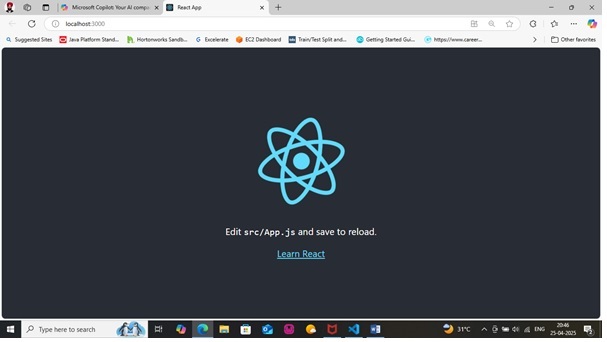
Wait for the server to start and open your first default reactjs-app in your default web browser.
To Open the reactjs-app folder in the VS Code got to file menu and choose Open Folder item
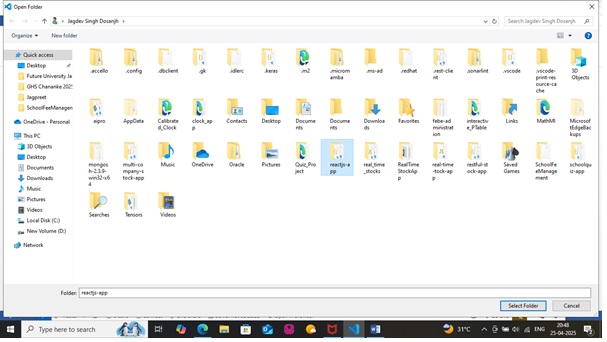
Select reactjs-app from the window explorer and press Select Folder button as shown in the snapshot above.
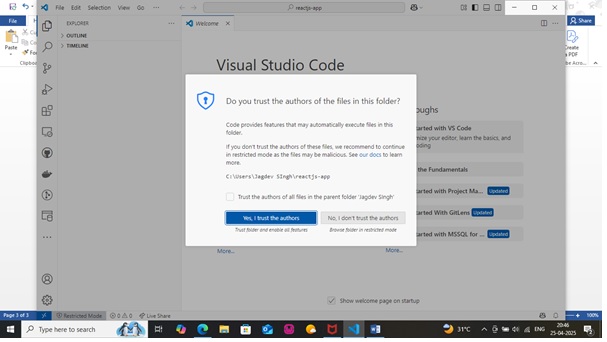
Click Yes, I trust the authors button with blue color to close the Welcome Screen
Now Click the Additional Views to open the folder view (as you selected from the screen above) as shown in the below snapshot
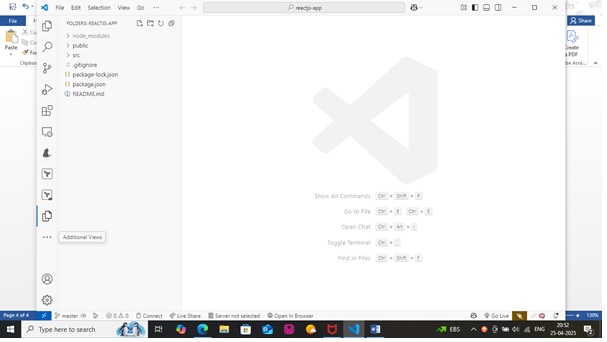
Explore the codes from within the public and src folders to better understand the ReactJS codes for this default App generated so for.
Thanks for Reading this Step By Step Help Document.
You can copy the entire ReactJS App from my GitHub Link below:
 Jagdev Singh
Leave a comment